
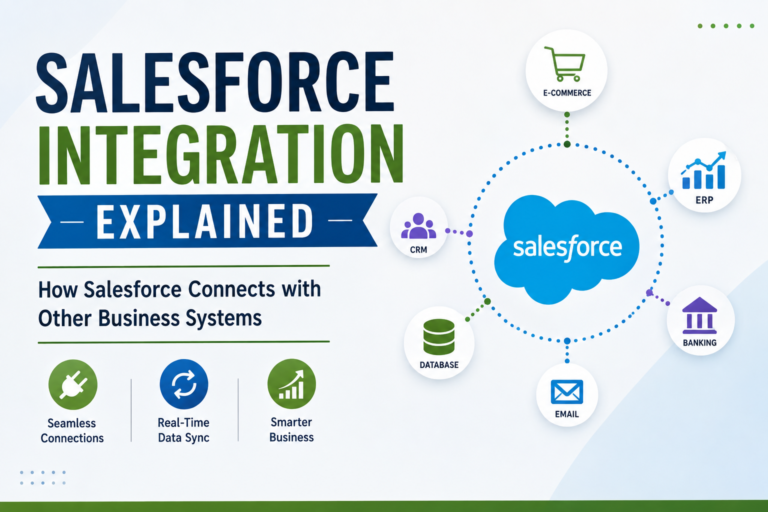
Salesforce Integration Explained: How Salesforce Connects with Other Business Systems
Introduction
Modern businesses rarely use only one software application. A company may use Salesforce for customer relationship management, an accounting platform for finances, an ERP system for operations, a marketing platform for campaigns, and separate applications for payments, communication, or analytics.
The challenge is making all these systems work together.
This is where Salesforce Integration becomes important.
Salesforce integration allows Salesforce to communicate with external applications and exchange information. Instead of employees manually copying data between systems, integrated applications can share information automatically.
For Salesforce professionals, understanding integration is an important step toward advanced technical knowledge. It can also open the door to roles involving development, consulting, architecture, and enterprise solutions.
In this guide, we’ll explain Salesforce integration in simple terms, explore APIs and common integration methods, and discuss how beginners can start learning this important Salesforce skill.
What Is Salesforce Integration?
Salesforce integration is the process of connecting Salesforce with another application or external system so that they can exchange data or trigger actions.
For example:
Salesforce → Payment System
Salesforce sends customer information to an external payment platform.
Or:
External Website → Salesforce
A customer submits a form on a website, and the information automatically creates a Lead in Salesforce.
Integration reduces manual data entry and helps businesses maintain connected systems.
Why Do Businesses Need Salesforce Integration?
Imagine a company receives customer orders through an e-commerce platform.
The sales team works in Salesforce, while the order information exists in another system.
Without integration, employees may need to manually transfer:
Customer information
Order details
Product information
Payment status
This takes time and can lead to errors.
With integration, systems can exchange information automatically.
Key benefits include:
Reduced manual work
Faster data exchange
Improved accuracy
Better customer experience
More efficient business processes
Connected applications
A Simple Salesforce Integration Example
Consider an online business.
A customer places an order on the company’s website.
The website sends the customer’s information to Salesforce.
Salesforce creates or updates:
Account → Contact → Opportunity/Order Information
The customer-service team can then access the information without manually entering it.
This is a simple example of how integration can improve business operations.
What Is an API?
API stands for Application Programming Interface.
An API allows different software applications to communicate with each other.
Think of an API as a communication mechanism between systems.
For example:
Application A → API → Salesforce
or
Salesforce → API → Application B
APIs define how information can be requested, sent, updated, or processed.
Understanding APIs is an important foundation for Salesforce integration.
Salesforce REST API
REST API is commonly used when applications need to communicate with Salesforce using HTTP-based requests.
Developers can use REST API to work with Salesforce data from external applications.
Common operations include:
GET
POST
PATCH
DELETE
For example:
GET can retrieve information.
POST can create information.
PATCH can update information.
DELETE can remove information when appropriate.
Understanding these basic concepts is useful for Salesforce Developers and integration professionals.
Salesforce SOAP API
SOAP is another API technology used for system-to-system communication.
SOAP-based integrations typically use structured XML messages.
While REST is widely used for many modern web integrations, SOAP can still be relevant in certain enterprise environments and legacy systems.
Salesforce professionals should understand the differences between REST and SOAP at a conceptual level.
REST vs SOAP
A simple comparison:
REST SOAP
Generally lightweight More structured
Commonly uses JSON Commonly uses XML
Often easier for web applications Often used in enterprise/legacy environments
Uses HTTP methods Uses SOAP messaging standards
The best approach depends on the integration requirement.
What Is JSON?
JSON stands for JavaScript Object Notation.
It is a commonly used format for exchanging structured data between applications.
A simplified example could look like:
{
“name”: “Rahul”,
“email”: “rahul@example.com”
}
Salesforce professionals working with REST integrations should understand how JSON data is structured.
What Is Authentication?
External systems need a secure way to identify and authorize applications.
Authentication and authorization are therefore important parts of integration.
Salesforce integrations may involve concepts such as:
OAuth
Access Tokens
Connected Apps
Authentication Credentials
Security should always be considered when designing integrations.
What Is a Connected App?
A Connected App allows an external application to connect securely with Salesforce.
It can be configured to control how an external application accesses Salesforce resources.
For Salesforce Developers and integration professionals, understanding Connected Apps is an important part of learning Salesforce authentication.
Point-to-Point Integration
In a point-to-point integration, two systems communicate directly.
For example:
Salesforce ↔ Payment System
This can be appropriate for simple integration requirements.
However, as the number of systems increases, maintaining many direct connections can become more complicated.
Middleware-Based Integration
Larger organizations may use middleware to connect multiple systems.
A simplified structure could look like:
Salesforce → Middleware → ERP
Salesforce → Middleware → Marketing Platform
Salesforce → Middleware → External Application
Middleware can help manage communication between different systems and reduce the need for numerous direct connections.
Salesforce Integration Using Apex
Salesforce Developers can use Apex when custom integration logic is required.
Apex can be used to:
Make callouts
Process responses
Handle business logic
Integrate with external services
Developers should also understand Salesforce limits and best practices when working with integrations.
What Is an API Callout?
A callout occurs when Salesforce communicates with an external system.
For example:
Salesforce → External API
Salesforce sends a request and receives a response.
A Developer may need to process that response and update Salesforce records.
This is an important concept for Salesforce Development interviews.
Integration Project Example
Let’s consider a practical scenario.
Customer Registration System
A company has a website where customers register.
Requirement
Whenever a customer registers on the website, Salesforce should create a customer record.
Possible Process
Step 1: Customer submits the website form.
Step 2: Website sends customer information through an API.
Step 3: Salesforce receives the request.
Step 4: Salesforce validates the information.
Step 5: Salesforce creates or updates the appropriate record.
Step 6: The website receives a response.
This type of project helps learners understand how systems communicate.
Integration Skills Salesforce Developers Should Learn
If you want to specialize in Salesforce Integration, consider learning:
REST API
SOAP API
HTTP Methods
JSON
XML
OAuth
Connected Apps
Apex Callouts
API Testing
Error Handling
Integration Architecture
You don’t need to learn everything at once.
Start with API fundamentals and gradually move toward practical projects.
Integration and Salesforce Interviews
Integration is an important topic for technical Salesforce interviews.
Common questions may include:
What is an API?
Explain how applications communicate.
What is REST API?
Discuss HTTP-based communication and common methods.
What is SOAP?
Explain its structured messaging approach.
What is JSON?
Describe its use in exchanging structured data.
What is OAuth?
Explain its role in secure authorization.
What is a Callout?
Explain how Salesforce communicates with an external system.
Scenario-based questions are particularly useful for testing practical understanding.
Common Salesforce Integration Mistakes
Ignoring Security
Integration should always consider authentication and authorization.
Not Handling Errors
External systems can fail or return unexpected responses.
Ignoring Data Validation
Incoming information should be checked before being processed.
Building Without Understanding the Requirement
Always understand what information needs to move between systems and why.
Testing Only One Scenario
Test successful, failed, incomplete, and unexpected cases.
How Beginners Can Learn Salesforce Integration
A beginner-friendly roadmap could be:
Stage 1
Learn Salesforce fundamentals.
Stage 2
Learn Administration and data management.
Stage 3
Understand Apex and SOQL basics.
Stage 4
Learn HTTP and API fundamentals.
Stage 5
Study REST and SOAP concepts.
Stage 6
Practice JSON and authentication.
Stage 7
Build a simple integration project.
Stage 8
Learn advanced integration architecture.
This gradual approach makes integration easier to understand.
Why Integration Skills Can Be Valuable
As businesses use more cloud applications, connecting systems becomes an important technical requirement.
Salesforce professionals with integration knowledge may explore roles involving:
Salesforce Development
Integration Development
Salesforce Consulting
Technical Consulting
Solution Architecture
CRM Technology
Integration is therefore a useful skill for professionals who want to move beyond basic Salesforce configuration.
Why Choose Prabh Kirpa Classes?
At Prabh Kirpa Classes, learners can develop Salesforce skills through structured and practical training.
Training areas include:
Salesforce Administration
Salesforce Development
Flow Builder
Apex
SOQL
Lightning Web Components
Salesforce Integration
OmniStudio
Practical Assignments
Live Projects
Certification Guidance
Resume Preparation
Mock Interviews
Job Support
The focus is on helping learners understand Salesforce concepts and apply them to practical business scenarios.
Frequently Asked Questions
Is Salesforce Integration difficult for beginners?
It can seem technical at first, but beginners can learn it gradually by understanding APIs, data exchange, authentication, and simple integration examples.
Do I need coding knowledge for Salesforce Integration?
Some integration concepts can be understood without advanced coding, but technical integration roles generally require development knowledge such as Apex and API concepts.
Is REST API important for Salesforce Developers?
Yes. REST API is an important integration concept for developers working with external applications.
What should I learn before Salesforce Integration?
A strong understanding of Salesforce fundamentals, Administration, data management, and basic development concepts can provide a useful foundation.
Can integration knowledge help with a Salesforce career?
Yes. Integration is a valuable technical skill that can complement Salesforce Development, Consulting, and other advanced career paths.
Conclusion
Salesforce Integration allows organizations to connect Salesforce with external applications and create more efficient, automated business processes. From REST and SOAP APIs to JSON, authentication, Apex callouts, and middleware, integration involves several important concepts.
For beginners, the best approach is to learn step by step. Start with Salesforce fundamentals, understand data and development concepts, learn API basics, and then build practical integration projects.
At Prabh Kirpa Classes, learners can develop Salesforce Administration, Development, Integration, LWC, Apex, OmniStudio, and other practical skills along with project experience, certification guidance, interview preparation, and job support.
Understand the requirement. Connect the systems. Build smarter Salesforce solutions.
Newsletter
Recent Posts
Salesforce Integration Explained: How Salesforce Connects with Other Business Systems
Introduction Modern businesses rarely use only one software application. A
Salesforce Admin vs Salesforce Developer: Which Career Path Is Right for You in 2026?
Introduction Salesforce has become an important platform for organizations that
András Baka Elected President of Hungary | Hungary New President 2026 | Daily Current Affairs
András Baka has been elected as the new President of
India Achieves 20% Ethanol Blending | ESY 2025-26 | Daily Current Affairs MCQ
India achieved the 20% ethanol blending target in petrol during