
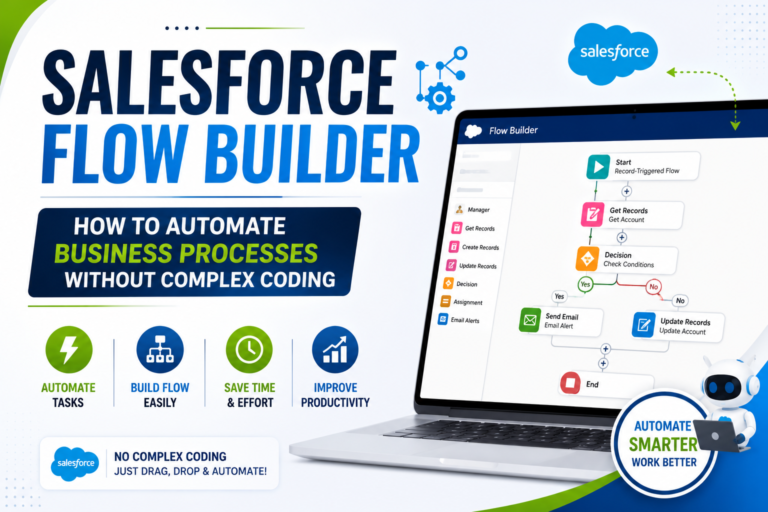
Salesforce Flow Builder: How to Automate Business Processes Without Complex Coding
Introduction
Businesses perform hundreds of repetitive activities every day. Employees may need to update records, create follow-up tasks, send notifications, collect information, assign work, or check whether certain conditions have been met.
Doing these activities manually can take time and may also increase the possibility of errors.
Salesforce provides Flow Builder to help organizations automate many business processes using a visual, low-code approach. Salesforce describes Flow Builder as a primary tool for creating flows, with elements, connectors, and resources used to build automation.
For Salesforce Administrators and aspiring Salesforce professionals, Flow has therefore become an important skill to understand.
In this blog, we’ll explore what Flow Builder is, how it works, different types of flows, practical examples, common mistakes, and how learning automation can help you develop stronger Salesforce skills.
What Is Salesforce Flow Builder?
Salesforce Flow Builder is a visual tool used to create automated business processes.
Instead of writing code for every requirement, users can build many processes by connecting visual elements on a canvas.
A flow can:
Collect information
Find records
Create records
Update records
Delete records
Make decisions
Send notifications
Send emails
Interact with external systems
Salesforce documentation explains that Flow can automate updates to Salesforce data and can also work with external systems.
This makes Flow useful for both simple and more advanced business requirements.
Why Is Salesforce Automation Important?
Consider a sales organization.
Whenever a high-value opportunity is created, the sales manager wants a follow-up task automatically assigned to a team member.
Without automation, someone may need to manually:
Find the opportunity.
Check its value.
Create a task.
Assign the task.
Set a due date.
With a properly designed Flow, these steps can be automated.
Salesforce highlights that Flow can automate routine tasks such as creating follow-up tasks, sending reminder emails, and updating records.
The result can be a more consistent and efficient process.
How Does a Flow Work?
A simple way to understand a Flow is:
Start → Get Information → Make a Decision → Perform an Action → Finish
For example:
New Opportunity
↓
Check Opportunity Amount
↓
Is Amount Greater Than the Required Value?
↓
Yes → Create Follow-Up Task
↓
No → End
This visual approach makes it easier to understand how an automated process works.
The Three Building Blocks of Flow
Salesforce Trailhead explains that flows use three major building blocks:
1. Elements
Elements perform specific actions or logic.
2. Connectors
Connectors determine the path the flow follows.
3. Resources
Resources store values or information that the flow can use.
Understanding these three concepts provides a strong foundation for learning Flow Builder.
Important Flow Elements
Get Records
The Get Records element retrieves Salesforce records.
For example, a Flow might search for a customer’s Account before performing another action.
Create Records
This element creates a new Salesforce record.
Example:
A new employee joins a company, and the Flow automatically creates an onboarding task.
Update Records
This element updates existing records.
Example:
When an Opportunity reaches a particular stage, the Flow can update another field automatically.
Delete Records
This element can delete records when the business requirement allows it.
Because deleting data can have significant consequences, it should be used carefully and tested properly.
Decision
A Decision element allows a Flow to follow different paths depending on conditions.
For example:
Customer Type = Premium
→ Send Priority Notification
Customer Type = Standard
→ Follow Standard Process
Decision logic is one of the most important concepts for creating useful automation. Salesforce describes logic elements as tools for evaluating data and determining different paths through a flow.
Types of Salesforce Flows
Different business requirements need different types of flows.
1. Record-Triggered Flow
A Record-Triggered Flow can automatically run when a record is created, updated, or deleted, depending on its configuration.
Example
Whenever a new Lead is created, the Flow checks its information and performs a predefined action.
This is useful for behind-the-scenes automation.
2. Screen Flow
A Screen Flow interacts with users.
It can display screens, ask questions, collect information, and then perform actions based on the user’s input. Salesforce describes Screen Flows as a way to create guided user experiences and forms.
Example
An employee opens a service-request form.
The Flow asks:
Employee Name
Department
Request Type
Description
Priority
After submission, Salesforce can create the appropriate record.
3. Autolaunched Flow
An Autolaunched Flow runs without directly displaying a user interface.
It can be invoked by another automation, Apex, or other supported mechanisms.
These flows can be useful when reusable automation logic is required.
4. Scheduled-Triggered Flow
Some business processes need to happen according to a schedule.
For example, an organization may want to identify records that require follow-up and perform an action at a particular time.
Salesforce supports scheduled-triggered flows for automation that runs according to a specified schedule.
Practical Example: Automating Lead Follow-Up
Let’s consider a simple business requirement.
Requirement
A company wants a follow-up task automatically created whenever a new Lead meets certain criteria.
Flow Design
Start
↓
New Lead Created
↓
Decision
Is the Lead’s status and other criteria appropriate?
↓
Yes
Create Follow-Up Task
↓
Assign Task
↓
End
This eliminates the need for an employee to manually create the task every time.
Practical Example: Employee Onboarding
Flow can also be used for employee onboarding processes.
Imagine an organization creates a new employee record.
A Flow could help initiate tasks such as:
Create onboarding tasks
Notify the relevant team
Update employee information
Request required documentation
Track completion
A Screen Flow could also collect information directly from the employee or HR team.
This type of project is useful for learners because it combines data, user interaction, logic, and automation.
Practical Example: Customer Support
Consider a customer-service organization.
A customer creates a Case.
The business wants different processes depending on priority.
High Priority
→ Assign to priority support team
Medium Priority
→ Assign to standard support queue
Low Priority
→ Follow normal process
A Decision element can help direct the Flow according to the defined conditions.
Flow Builder and Data Management
Flow isn’t limited to simple notifications.
Salesforce states that flows can retrieve data, create records, update records, delete records, and interact with external systems.
This means Flow can become an important part of an organization’s data-management strategy.
For example:
Get Customer Record
↓
Check Customer Status
↓
Update Related Record
↓
Send Notification
This creates a connected automated process.
Flow and External Systems
Some business requirements involve data outside Salesforce.
For example:
Salesforce → External Application
or
External Application → Salesforce
Salesforce documentation describes ways for flows to connect with external systems through supported features such as integration connectors and HTTP callout actions.
This makes Flow useful beyond basic Salesforce record automation.
Why Testing a Flow Is Important
Creating a Flow is only part of the process.
You should test it before activation.
Salesforce recommends testing flows with sample data and different scenarios, and notes that testing in a sandbox can help prevent unintended changes to real records.
For example, if your Flow contains a Decision, test:
Scenario A → Condition is true
Scenario B → Condition is false
Scenario C → Required information is missing
Scenario D → Unexpected data is entered
Testing helps identify problems before users rely on the automation.
Common Flow Mistakes Beginners Make
1. Building Without Understanding the Requirement
Don’t immediately open Flow Builder.
First understand:
What problem are we solving?
Salesforce itself recommends planning the business process before building the Flow.
2. Creating Unnecessary Complexity
Start with the simplest solution that satisfies the requirement.
3. Not Testing Different Scenarios
A Flow may work correctly in one situation and fail in another.
Test multiple scenarios.
4. Ignoring Error Handling
Salesforce provides fault paths and other mechanisms for handling failures in flows.
Understanding error handling becomes increasingly important as your Flows become more complex.
5. Learning Only Through Theory
Watching tutorials is useful, but Flow is primarily a practical skill.
Build your own automations.
How to Practice Flow Builder
Start with small projects.
Beginner Project 1
Automatically create a task when a specific record is created.
Beginner Project 2
Create a Screen Flow for collecting customer information.
Beginner Project 3
Automatically update a field when a particular condition is met.
Intermediate Project 4
Create multiple paths using Decision elements.
Intermediate Project 5
Build an employee onboarding automation.
Advanced Project 6
Create an automation that interacts with an external system.
Each project can introduce a new concept.
Flow Builder and Salesforce Interviews
Flow is an important area to prepare if you’re targeting Salesforce roles.
Interviewers may ask:
What is Flow Builder?
What is a Record-Triggered Flow?
What is a Screen Flow?
What is an Autolaunched Flow?
What is Get Records?
What is a Decision element?
How do you update records using Flow?
How do you test a Flow?
How do you handle Flow errors?
You should also practice scenario-based questions.
For example:
“A business wants to automatically create a follow-up task when a particular type of Opportunity is created. How would you approach this requirement?”
Instead of memorizing an answer, explain your reasoning.
Why Flow Skills Matter for a Salesforce Career
Flow knowledge can be useful for several Salesforce roles.
Salesforce Administrator
Automate business processes using declarative tools.
Salesforce Developer
Understand when a requirement can be handled through Flow and when custom code may be appropriate.
Salesforce Consultant
Translate business requirements into automation solutions.
Salesforce Business Analyst
Understand how business processes can be improved through Salesforce automation.
This makes Flow a valuable skill across different career paths.
A Simple Learning Roadmap
If you’re new to Salesforce, follow a gradual approach:
Step 1
Learn Salesforce fundamentals.
Step 2
Understand objects and relationships.
Step 3
Learn data management.
Step 4
Understand Salesforce security.
Step 5
Learn Flow fundamentals.
Step 6
Build simple Record-Triggered Flows.
Step 7
Practice Screen Flows.
Step 8
Learn advanced logic and resources.
Step 9
Build practical projects.
Step 10
Prepare for Salesforce interviews.
This approach helps turn theoretical knowledge into practical skills.
Why Choose Prabh Kirpa Classes?
At Prabh Kirpa Classes, learners can develop practical Salesforce skills through structured training and hands-on learning.
Training areas include:
Salesforce Administration
Flow Builder
Salesforce Development
Apex
SOQL
Lightning Web Components
Salesforce Integration
OmniStudio
Practical Assignments
Live Projects
Certification Guidance
Resume Preparation
Mock Interviews
Job Support
The focus is on helping learners understand Salesforce concepts and apply them to realistic business requirements.
Frequently Asked Questions
Is Salesforce Flow Builder difficult to learn?
Flow becomes easier when learners understand Salesforce objects, data, conditions, and basic process logic.
Do I need coding knowledge to learn Flow?
Flow is a low-code/declarative tool, so many automation requirements can be built without writing traditional code. However, understanding programming logic can still be useful as you advance.
Is Flow important for Salesforce Administrator jobs?
Yes. Automation is an important part of Salesforce Administration, and Flow is a key tool for creating many Salesforce automations.
Should beginners learn Flow?
Yes. Once you understand basic Salesforce Administration and data concepts, Flow is a valuable next skill to learn.
Does Flow replace Apex?
Not in every situation. The appropriate solution depends on the business requirement, complexity, limits, integrations, and other technical considerations.
Conclusion
Salesforce Flow Builder is a powerful tool for automating business processes through a visual, low-code approach. From creating records and updating data to collecting information, making decisions, sending notifications, and connecting with external systems, Flow can support a wide range of business requirements.
For anyone preparing for a Salesforce career, Flow should be more than a theoretical topic. Build practical automations, test different scenarios, understand business requirements, and learn how to explain your solutions during interviews.
At Prabh Kirpa Classes, learners can develop Salesforce Administration, Flow Builder, Development, Integration, LWC, Apex, and other skills along with practical projects, certification guidance, interview preparation, and job support.
Learn Salesforce. Master automation. Build practical solutions.
Newsletter
Recent Posts

Salesforce Reports and Dashboards: How to Turn CRM Data Into Business Insights
Introduction Salesforce is not only a platform for storing customer
Salesforce Security Model Explained: A Complete Guide to Profiles, Roles, Permissions & Sharing
Introduction Data security is one of the most important responsibilities
Salesforce Flow Builder: How to Automate Business Processes Without Complex Coding
Introduction Businesses perform hundreds of repetitive activities every day. Employees

Salesforce Career Roadmap for Beginners: From First Lesson to Job-Ready Professional
Introduction Choosing a technology career can be challenging, especially when