
Salesforce Agentforce vs Flow: What’s the Difference and When Should You Use Each?
Salesforce automation has evolved significantly. For years, Salesforce Flow has been one of the primary low-code tools admins use to automate business processes.
Now, Agentforce introduces AI agents that can understand requests, use business context, select appropriate actions, and complete tasks.
This creates an important question for Salesforce professionals:
Should you use Salesforce Flow or Agentforce?
The answer is not necessarily one or the other.
Flow provides structured automation. Agentforce adds AI-driven reasoning and flexible interaction. And increasingly, they can work together.
Let’s understand the difference.
What Is Salesforce Flow?
Salesforce Flow is a low-code automation tool that allows admins and developers to build business processes using Flow Builder.
Instead of writing Apex for every automation requirement, you can create flows using visual elements such as:
Get Records → Decision → Update Records → Action
For example, when a high-value Opportunity becomes Closed Won, a Flow could automatically:
- Detect the record change.
- Check the Opportunity amount.
- Update related information.
- Create follow-up tasks.
- Trigger additional business actions.
The process follows logic defined by the builder.
Common Types of Salesforce Flow
Salesforce provides different flow capabilities for different automation scenarios.
Common examples include:
Record-Triggered Flows – Run when records are created, updated, or deleted under configured conditions.
Screen Flows – Guide users through an interactive process.
Schedule-Triggered Flows – Run automatically according to a schedule.
Autolaunched Flows – Run in the background without requiring screens.
The right type depends on how and when your automation needs to run.
What Is Salesforce Agentforce?
Agentforce is Salesforce’s platform for creating AI agents that can answer questions and perform business tasks.
Unlike a traditional fixed automation path, an agent can interpret a request, use available context and instructions, determine which permitted actions are relevant, and execute those actions within configured guardrails.
An Agentforce agent can be connected to Salesforce capabilities such as:
CRM Data
Flows
Apex
Prompt Templates
Knowledge
MuleSoft APIs
and other supported resources.
For example, imagine a sales representative asks:
“Show me my important opportunities that need attention and help me decide what to do next.”
An appropriately configured agent can interpret the request, use available business context and actions, and assist the user more dynamically than a traditional fixed workflow.
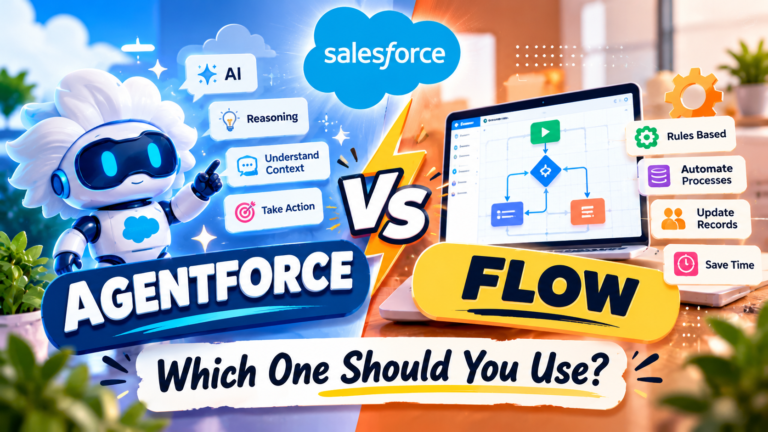
Salesforce Flow vs Agentforce: The Core Difference
The easiest way to understand the difference is:
Flow = Follow predefined process logic
Agentforce = Reason within defined instructions and choose appropriate actions
Consider a simple process.
Flow
Trigger → Condition → Decision → Action
You determine the process logic when building the automation.
Agentforce
Request → Understand Context → Reason → Select Appropriate Action → Respond/Act
The agent has more flexibility in deciding how to handle supported requests, while still operating within the instructions, actions, permissions, and guardrails you configure.
Example: Customer Support
Suppose a customer says:
“My order hasn’t arrived. Can you check what happened and tell me what I should do?”
A traditional Flow generally needs a defined process and the required inputs.
For example:
Order Number → Find Order → Check Status → Follow Decision Path → Display Result
Agentforce can provide a conversational layer around the experience.
The agent can interpret the customer’s request, collect or identify the necessary information, use available knowledge and data, and invoke approved actions.
One of those actions could itself be a Flow.
That is why Agentforce and Flow are often complementary rather than competing technologies.
When Should You Use Salesforce Flow?
Use Flow when the business process is predictable, structured, and rule-driven.
Examples include:
- Update a field when a record changes.
- Create a task when an Opportunity reaches a specific stage.
- Route records according to defined conditions.
- Send notifications when criteria are met.
- Run scheduled automation.
- Guide a user through a structured Screen Flow.
- Perform repeatable record operations.
If you can clearly describe the process as:
When X happens → Check Y → Do Z
Flow is often a strong option.
When Should You Use Agentforce?
Agentforce becomes valuable when the requirement involves natural-language interaction, contextual decision-making, AI assistance, or flexible task execution.
Examples include:
- Answering customer questions using approved business knowledge.
- Helping employees find information.
- Assisting sales representatives with account or opportunity-related tasks.
- Interpreting a user’s natural-language request.
- Selecting from multiple approved actions based on context.
- Handling conversational service experiences.
- Performing multi-step tasks where the path can vary depending on the request.
Instead of requiring the user to understand the underlying automation, the agent can provide a conversational interface to business capabilities.
Flow Is Deterministic; Agentforce Adds Reasoning
This distinction is important for Salesforce Admins.
A Flow generally executes the logic that you explicitly configure.
For example:
IF Amount > ₹10,00,000 → Send for approval
The condition and resulting path are predefined.
Agentforce introduces an AI reasoning layer.
The agent can interpret what the user wants and determine which available action is appropriate within its configured boundaries.
This flexibility is useful, but it also makes instructions, permissions, testing, guardrails, and governance extremely important.
Can Agentforce Use Salesforce Flow?
Yes.
This is one of the most important concepts to understand.
Flows can be exposed as actions that an Agentforce agent can use.
That means you don’t necessarily need to rebuild existing Salesforce automation simply because your organization adopts Agentforce.
Your existing Flow might continue to perform the structured business process while Agentforce provides the intelligent conversational layer that determines when that process should be used.
Think of it like this:
User Request
↓
Agentforce understands the request
↓
Agentforce selects an approved action
↓
Flow executes structured business logic
↓
Agentforce communicates the result
This combination can be extremely powerful.
Can Flow Use Agentforce?
Salesforce has also moved in the opposite direction.
Modern Flow Builder capabilities allow supported Agentforce agents to be invoked from flows.
This means a Flow can manage the predictable parts of a business process while an agent handles a task that benefits from AI reasoning.
Conceptually:
Flow Starts
↓
Structured Business Logic
↓
Run Agent
↓
Agent Handles AI-Appropriate Task
↓
Result Returns to Flow
↓
Flow Continues
This creates a hybrid automation model.
Agentforce + Flow: A Better Way to Think About It
Instead of asking:
“Should Agentforce replace Flow?”
A more useful question is:
“Which part of this process requires deterministic automation, and which part benefits from AI reasoning?”
For example:
A customer asks:
“Can I return the product I bought last month?”
Agentforce could understand the customer’s intent and gather relevant context.
A Flow could then perform the structured return process according to company rules.
So:
Agentforce = Understand and orchestrate
Flow = Execute structured processes
The exact division depends on the use case.
Salesforce Agentforce vs Flow: Quick Comparison
| Feature | Salesforce Flow | Agentforce |
|---|---|---|
| Primary Purpose | Process automation | AI-powered agents |
| Logic | Predefined | Contextual reasoning within configured controls |
| Natural Language | Not its primary interaction model | Core capability |
| Record Automation | Excellent | Can use actions to perform tasks |
| Conversational Experience | Limited by implementation | Core capability |
| AI Reasoning | Not the core execution model | Yes |
| Can Use Flow | — | Yes |
| Can Work with Agentforce | Yes | Yes |
| Best For | Structured processes | Dynamic, conversational tasks |
Example: Sales Use Case
Imagine a sales representative says:
“Help me follow up with my most important opportunities.”
Agentforce can help interpret what the representative wants and work with available CRM context and approved actions.
A Flow could handle deterministic operations such as:
Create Follow-Up Task → Set Due Date → Update Record → Notify Owner
Together:
Sales Rep → Agentforce → Flow → Salesforce Records
The user gets a more natural experience while the structured automation remains controlled.
Example: Service Use Case
A customer says:
“I want to know why my case is still open.”
Agentforce can understand the question and use the available case context.
Depending on the configured actions, it might retrieve relevant information or invoke automation.
Flow can then handle a predefined process such as:
Check Criteria → Update Case → Create Escalation → Notify Team
Agentforce can communicate the outcome conversationally.
Does Agentforce Replace Salesforce Flow?
No—not generally.
Agentforce and Flow solve different problems.
Flow remains highly useful for predictable Salesforce automation.
Agentforce introduces an intelligent layer capable of understanding natural-language requests and orchestrating permitted actions.
In fact, Salesforce allows agents to use existing platform tools such as Flows and Apex as actions.
So the future of Salesforce automation is increasingly about combining these capabilities rather than choosing only one.
What Should Salesforce Admins Learn First?
If you’re a Salesforce Admin, build a strong foundation in Flow first.
Understand:
Triggers
Decisions
Variables
Loops
Get/Create/Update Records
Subflows
Error Handling
Then move into Agentforce concepts such as:
Agents
Instructions
Actions
Context
Testing
Guardrails
Permissions
Understanding Flow makes Agentforce easier because many useful agent actions can rely on automation and business logic that already exists in Salesforce.
A Simple Decision Framework
Ask these questions before choosing a tool.
Is the process predictable?
Use Flow.
Does the user need a conversational experience?
Consider Agentforce.
Does the task require interpreting flexible natural-language requests?
Consider Agentforce.
Does the process need strict predefined business logic?
Use Flow.
Do you need both AI reasoning and controlled automation?
Use Agentforce + Flow.
The Future: Agentic Automation
Salesforce automation is moving beyond simple:
Trigger → Condition → Action
Organizations can increasingly build experiences that combine:
Data + AI Reasoning + Business Logic + Automation + Human Oversight
Flow remains an important automation engine.
Agentforce adds a layer that can understand context, reason about requests, and select appropriate tools.
Together, they allow Salesforce teams to build automation that is both structured and intelligent.
Final Thoughts
Salesforce Flow and Agentforce should not be viewed simply as competitors.
They serve different but complementary purposes.
Use Salesforce Flow when you need reliable, structured, rule-based automation.
Use Agentforce when you need conversational interaction, contextual reasoning, and flexible AI-assisted task execution.
And when a business process requires both?
Combine Agentforce with Flow.
For Salesforce Admins, learning both technologies is becoming increasingly valuable. Understanding how to design reliable Flow automation—and then make those capabilities available to AI agents—can help you build more powerful Salesforce solutions.
Flow automates the process. Agentforce makes the experience intelligent.
Newsletter
Recent Posts
Salesforce Agentforce vs Flow: What’s the Difference and When Should You Use Each?
Salesforce automation has evolved significantly. For years, Salesforce Flow has

US Temple Shooting Plot Foiled | Sri Venkateswara Swami Temple Located in Which State? | GK Quiz
🇺🇸 Important International Current Affairs 2026!
A suspected mass-shooting plot
Student Protests & Civil Service Strikes Rock Europe 🚨🇪🇺 | Which Country? | Current Affairs Q5
A European nation is facing widespread student mobilizations and civil

New AI Cyber Threat? | What Is Agentic AI? | CERT-In Current Affairs 2026 | GK Quiz
A New AI-Powered Cyber Threat: Test Your GK!
India’s cybersecurity