
Salesforce Sandbox Types Explained: Developer, Partial Copy & Full
When working with Salesforce, making changes directly in the production environment can be risky. A configuration error, faulty automation, or untested code could affect real users and business data.
That’s where Salesforce Sandboxes come in.
A Salesforce Sandbox is an isolated copy of your production environment that teams can use for development, testing, training, and quality assurance without directly affecting the live production org.
But Salesforce offers different types of sandboxes, and each serves a different purpose.
In this guide, we’ll understand Developer, Developer Pro, Partial Copy, and Full Sandboxes and when you should use each one.
What Is a Salesforce Sandbox?
A Salesforce Sandbox is a separate environment based on your production Salesforce org.
Depending on the sandbox type, it may contain:
- Salesforce configuration and metadata
- Custom objects and fields
- Apex classes and triggers
- Flows and other automation
- Applications and settings
- Sample or production data
Because the sandbox is separate from production, teams can build and test changes without immediately affecting live users.
A simple development lifecycle might look like:
Development → Testing → User Acceptance Testing → Production
Sandboxes help support these different stages.
1. Developer Sandbox
A Developer Sandbox is primarily designed for development and basic testing.
It includes a copy of the production org’s configuration and metadata but does not provide a copy of production business data.
Best For
- Developing new features
- Creating Flows
- Writing Apex code
- Building Lightning components
- Configuration changes
- Basic unit testing
Example
Suppose a developer wants to create a new Record-Triggered Flow for Opportunities.
Instead of building it directly in production, the developer can create and test the automation inside a Developer Sandbox.
Once testing is complete, the changes can move through the organization’s deployment process.
2. Developer Pro Sandbox
A Developer Pro Sandbox is similar to a Developer Sandbox but provides more storage capacity.
It is useful when development or testing requires more records and files than a standard Developer Sandbox can comfortably support.
Best For
- Larger development projects
- Integration testing
- More extensive test datasets
- Development involving multiple features
- Quality assurance environments
Think of it as:
Developer Sandbox + More Storage Capacity
It still isn’t intended to provide a complete copy of production business data.
3. Partial Copy Sandbox
A Partial Copy Sandbox contains Salesforce configuration and metadata along with a selected sample of production data.
The data copied into the sandbox is controlled through a Sandbox Template.
This makes Partial Copy particularly useful when realistic business data is required for testing but a complete production copy isn’t necessary.
Best For
- User Acceptance Testing (UAT)
- Integration testing
- Quality assurance
- Testing realistic business scenarios
- Training in selected use cases
Example
Imagine an organization has millions of Accounts, Contacts, and Opportunities.
The testing team doesn’t necessarily need every production record.
A Partial Copy Sandbox can provide a representative subset of production data, allowing testers to work with more realistic scenarios without requiring a complete production replica.
4. Full Sandbox
A Full Sandbox is designed to provide the closest sandbox representation of the production environment.
It includes production configuration and metadata and can contain production data.
Because of this, Full Sandboxes are particularly valuable for comprehensive testing.
Best For
- Performance testing
- Load testing
- Large-scale integration testing
- User Acceptance Testing
- Staging
- Testing major releases
Example
Suppose a company is preparing a major Salesforce implementation involving multiple integrations, automations, and business processes.
Before deploying everything to production, the team may use a Full Sandbox to test the solution in an environment that closely resembles production.
Developer vs Developer Pro vs Partial Copy vs Full
| Feature | Developer | Developer Pro | Partial Copy | Full |
|---|---|---|---|---|
| Metadata & Configuration | Yes | Yes | Yes | Yes |
| Production Data | No | No | Selected Data | Production Data |
| Storage | Low | Higher | Higher | Highest |
| Development | Excellent | Excellent | Possible | Possible |
| Integration Testing | Limited | Good | Very Good | Excellent |
| UAT | Limited | Limited | Very Good | Excellent |
| Performance/Load Testing | Not Ideal | Not Ideal | Limited | Best Suited |
| Production-Like Environment | Low | Low | Medium | Highest |
Which Salesforce Sandbox Should You Choose?
The right sandbox depends on what you’re trying to accomplish.
For individual development:
Choose a Developer Sandbox.
For development requiring additional storage:
Choose a Developer Pro Sandbox.
For testing with representative production data:
Choose a Partial Copy Sandbox.
For comprehensive testing in a production-like environment:
Choose a Full Sandbox.
A simple way to remember the progression is:
Developer → Developer Pro → Partial Copy → Full
As you move across this sequence, the environments generally support increasingly extensive testing requirements and larger datasets.
What Is a Sandbox Template?
Sandbox Templates are particularly important when working with Partial Copy and Full Sandboxes.
A Sandbox Template allows administrators to select which objects and related data should be copied from production into the sandbox.
For example:
Account → Contact → Opportunity → Opportunity Products
Instead of copying unnecessary information, teams can create a sandbox dataset that better matches their testing requirements.
Sandbox Refresh: What Does It Mean?
A sandbox doesn’t automatically stay synchronized with production.
A sandbox refresh replaces the sandbox with a newer copy based on the production environment.
This is useful when teams need updated configuration or data for upcoming development and testing.
Refresh availability varies by sandbox type, so teams should plan refreshes carefully around development cycles and releases.
Also remember that refreshing a sandbox can replace existing work or data in that sandbox, so important changes should be deployed, committed, or otherwise preserved before a refresh.
Important Security Consideration
Partial Copy and Full Sandboxes may contain production data.
That means sandbox security should not be treated casually.
Organizations should consider:
- User access
- Sensitive information
- Data masking
- Integration endpoints
- Email configuration
- Connected systems
- Test-user permissions
A sandbox is a testing environment, but the information inside it may still require strong security controls.
Common Sandbox Mistakes to Avoid
One common mistake is assuming that every team needs a Full Sandbox.
In reality, many development activities can be completed efficiently using Developer or Developer Pro Sandboxes.
Another mistake is using unrealistic test data. Testing with poor-quality data can hide problems that only appear after deployment.
Teams should also avoid refreshing sandboxes without checking whether developers have unfinished work inside them.
Finally, integrations should be reviewed carefully so that sandbox testing does not accidentally trigger actions in live external systems.
Final Thoughts
Salesforce Sandboxes provide a safer way to develop, test, and validate changes before releasing them to production.
The four major sandbox types serve different purposes:
Developer — Development and basic testing
Developer Pro — Development with greater storage requirements
Partial Copy — Testing with a representative subset of production data
Full — Comprehensive testing with the closest representation of production
Choosing the right sandbox helps teams create a more structured Salesforce development lifecycle while reducing the risk of introducing problems into the live environment.
For Salesforce admins and developers, understanding sandbox types is an essential skill for managing development, testing, deployment, and release processes effectively.
Newsletter
Recent Posts
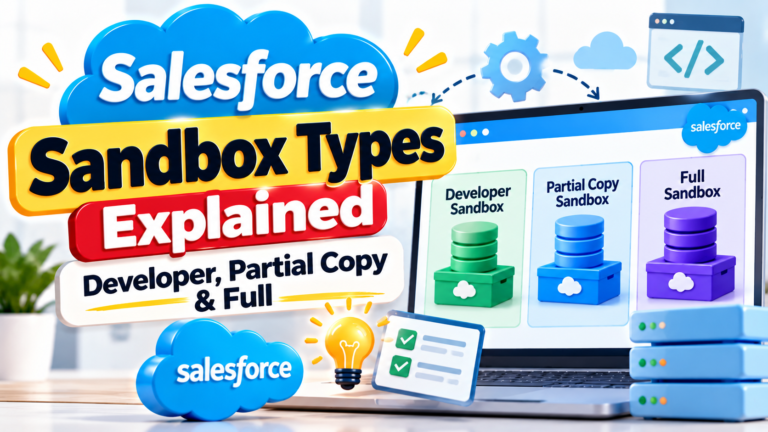
Salesforce Sandbox Types Explained: Developer, Partial Copy & Full
When working with Salesforce, making changes directly in the production

Asian Para Games 2026 🥇🏃♀️ | Who Won Gold in Women’s 400m T20? | Current Affairs Q7
Test your knowledge of Indian sports current affairs! 🥇🇮🇳
At
Bathukamma Festival 2026 🌸 | Which State Celebrates Saddula Bathukamma? | Current Affairs Q6
Test your knowledge of Indian culture and festivals! 🌸🧠
Bathukamma

CIML Meeting 2026 🌍⚖️ | Which Country Will Host the 61st Meeting? | Current Affairs Q4
Test your knowledge of international organizations and global current affairs!