
What Is Salesforce? A Complete Beginner’s Guide
## Introduction
Businesses today need more than spreadsheets and emails to manage their customers. They need a reliable system to organize customer information, track sales opportunities, improve customer service, and automate repetitive tasks.
This is where Salesforce comes in.
Salesforce is a cloud-based Customer Relationship Management (CRM) platform that helps businesses manage customer relationships and connect different business processes. It provides tools for sales, customer service, marketing, analytics, automation, and application development.
Whether you are a student, a fresher, a working professional, or someone planning to change careers, learning Salesforce can help you understand how modern businesses manage their customer relationships.
In this complete beginner’s guide, you will learn what Salesforce is, how it works, its important features, Salesforce products, real-world examples, career opportunities, and the steps you can follow to start learning Salesforce.
## What Is Salesforce?
Salesforce is a cloud-based CRM platform that helps businesses store, organize, and manage customer information in one place.
CRM stands for Customer Relationship Management. It refers to the strategies and technologies businesses use to manage their interactions with existing customers and potential customers.
Salesforce allows authorized users to access customer records, track leads, manage sales opportunities, automate workflows, and monitor business performance through reports and dashboards.
Unlike traditional software that may require local installation and maintenance, Salesforce is primarily accessed through a web browser or supported mobile applications.
### Simple Example of Salesforce
Imagine a company that sells software to other businesses.
The company has hundreds of potential customers. Its sales team needs to know:
– Who are the potential customers?
– Which salesperson is handling each lead?
– Which customers have scheduled meetings?
– Which deals are close to completion?
– Which customers need follow-up calls?
Managing all this information manually can become difficult.
With Salesforce, the company can store customer details, assign leads to sales representatives, track opportunities, schedule follow-ups, and generate reports.
This helps the team organize its work and make better-informed decisions.
## How Does Salesforce Work?
Salesforce works by bringing business data, users, automation, and reporting tools together on a cloud platform.
Here is a simplified explanation of how it works:
**Step 1: Store customer information**
Businesses create records containing details about customers, companies, leads, and sales opportunities.
**Step 2: Organize the data**
Salesforce uses objects, fields, and records to structure information so that users can find and manage it efficiently.
**Step 3: Automate business processes**
Administrators and developers can automate tasks such as assigning leads, updating records, and notifying employees.
**Step 4: Track business performance**
Reports and dashboards help managers analyze sales activity, customer service performance, and other business metrics.
**Step 5: Customize the platform**
Businesses can configure Salesforce using declarative tools or extend it with code to meet their specific requirements.
For example, a company can create a custom approval process for large discounts or develop an integration between Salesforce and an external business application.
## What Is Salesforce CRM?
Salesforce CRM is the collection of customer relationship management capabilities provided by Salesforce.
It helps businesses maintain a shared view of customer information across different teams.
For example, when a salesperson updates an Opportunity, other authorized team members can access the updated information according to their permissions.
This improves coordination between sales, service, and other departments.
### Important Features of Salesforce CRM
**1. Contact Management**
Contact Management allows businesses to store and organize information about individual customers, such as names, email addresses, phone numbers, and related company details.
**2. Lead Management**
Lead Management helps businesses track potential customers from initial interest through qualification and conversion.
**3. Opportunity Management**
Opportunity Management allows sales teams to track potential deals, estimated revenue, stages, and expected closing dates.
**4. Workflow Automation**
Salesforce provides automation tools that can reduce repetitive manual tasks and support consistent business processes.
**5. Reports and Dashboards**
Reports organize business data, while dashboards present selected information visually to help users monitor performance.
**6. Customization**
Salesforce can be configured with custom fields, objects, layouts, validation rules, and other features to meet business requirements.
## What Are the Main Salesforce Products?
Salesforce offers multiple products and capabilities for different business needs. The products an organization uses depend on its requirements, licensing, and implementation. <Cite refs={[“turn497129search0″,”turn497129search3”]}/>
### 1. Salesforce Sales Cloud
Sales Cloud helps businesses manage sales activities and customer relationships.
Common uses include:
– Managing leads and contacts
– Tracking sales opportunities
– Managing accounts
– Forecasting sales
– Monitoring sales performance
Example: A sales manager can use Sales Cloud to track the progress of deals and identify opportunities that need attention.
### 2. Salesforce Service Cloud
Service Cloud supports customer service teams in managing customer inquiries, support requests, and service processes.
Common uses include:
– Managing customer cases
– Tracking support requests
– Organizing service interactions
– Supporting service teams
– Improving visibility into customer issues
Example: When a customer reports a product issue, a support representative can create a Case and track its progress until resolution.
### 3. Salesforce Marketing Cloud
Salesforce marketing products support customer engagement and marketing activities, including personalized communications and customer journeys.
Example: A marketing team can use supported marketing tools to send relevant communications to customers based on their preferences and interactions.
### 4. Salesforce Experience Cloud
Experience Cloud helps organizations build digital experiences for customers, partners, and other users.
Example: A company can create a customer portal where users can access relevant information and interact with the organization.
### 5. Salesforce Data and Analytics Tools
Salesforce offers data and analytics capabilities that help organizations connect information and understand business performance.
For example, Tableau supports data visualization and analytics, while Salesforce data capabilities can help organizations unify information from different sources.
### 6. Salesforce Platform
The Salesforce Platform provides tools to build and customize business applications.
Administrators can use declarative configuration, while developers can use technologies such as Apex and Lightning Web Components (LWC) to implement more advanced requirements.
### 7. Salesforce Agentforce
Agentforce provides capabilities for building and deploying AI agents that can assist with tasks and take actions within defined workflows and permissions.
For example, an organization might configure an agent to help answer customer questions or support sales processes.
AI capabilities depend on the product, configuration, available data, and organizational controls.
## What Are Salesforce Objects, Fields, and Records?
If you are learning Salesforce for the first time, understanding objects, fields, and records is essential.
### What Is an Object in Salesforce?
An object is a structure used to store a particular type of information.
Salesforce includes standard objects and allows organizations to create custom objects.
Examples of standard objects include:
– Account
– Contact
– Lead
– Opportunity
– Case
A custom object can store information specific to a business requirement, such as Training Enrollment or Project Details.
### What Is a Field in Salesforce?
A field stores an individual piece of information on a record.
For example, an Account object may contain fields such as Account Name, Phone, Website, and Industry.
Fields can use different data types, including text, number, date, checkbox, and picklist.
### What Is a Record in Salesforce?
A record is an individual entry within an object.
For example, an Account record might represent ABC Technologies, while another Account record represents XYZ Solutions.
Think of it this way:
– Object = a table or category of information
– Field = a column or attribute
– Record = an individual entry
Understanding these concepts makes it easier to learn Salesforce administration, automation, and development.
## What Is the Difference Between Salesforce Admin and Salesforce Developer?
Salesforce offers different career paths depending on your interests and technical skills.
A Salesforce Administrator focuses primarily on configuring the platform, managing users, maintaining data quality, and automating business processes.
A Salesforce Developer focuses on building custom functionality through programming and technical development tools.
| Feature | Salesforce Administrator | Salesforce Developer |
|—|—|—|
| Main focus | Configuration and platform management | Custom development |
| Coding | Often limited, depending on the role | Commonly required |
| Important skills | Objects, fields, security, Flow, reports | Apex, SOQL, LWC, debugging |
| Typical tasks | User management, automation, reporting | Classes, triggers, components, integrations |
| Suitable for | People interested in configuration and business processes | People interested in programming and technical problem-solving |
Both roles can involve troubleshooting, automation, testing, and collaboration with business teams.
You do not need to become a developer to begin learning Salesforce. Many beginners start with administration concepts and then explore development as their skills grow.
## What Is Salesforce Flow?
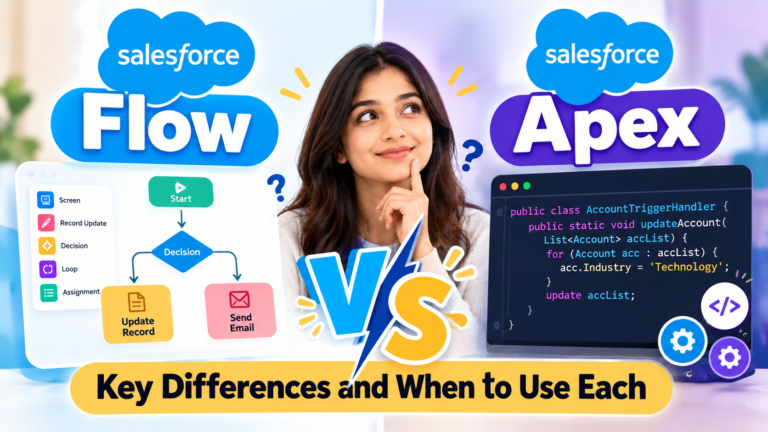
Salesforce Flow is a declarative automation tool that allows users to build business processes using a visual interface.
It can automate tasks without requiring traditional code for many common scenarios.
For example, a Record-Triggered Flow can update a field when a record meets certain conditions.
Common Flow types include:
– Screen Flow
– Record-Triggered Flow
– Schedule-Triggered Flow
– Autolaunched Flow
Salesforce Flow is an important skill for administrators and is also useful for developers who work on automation projects.
## What Is Apex in Salesforce?
Apex is Salesforce’s programming language. It allows developers to implement custom business logic and functionality on the Salesforce platform.
Apex is commonly used for:
– Apex triggers
– Apex classes
– Complex business calculations
– Custom integrations
– Advanced data processing
For example, a developer might use Apex to implement complex pricing rules that are difficult to maintain using declarative configuration alone.
Beginners who want to become Salesforce Developers should learn programming fundamentals before progressing to Apex classes, triggers, SOQL, DML, and bulkification.
## What Is Lightning Web Components (LWC)?
Lightning Web Components, commonly called LWC, is a Salesforce framework for building user interfaces using modern web technologies.
It uses JavaScript, HTML, and supported Salesforce development features to create interactive components.
For example, a developer can build a custom customer information panel or a reusable component that displays important Account details.
LWC is particularly relevant for people pursuing Salesforce development roles.
## Benefits of Learning Salesforce
Learning Salesforce can help you develop skills relevant to CRM implementation, business automation, and application development.
### 1. Multiple Career Paths
You can explore roles such as Salesforce Administrator, Salesforce Developer, Salesforce Consultant, Business Analyst, and other Salesforce-related positions.
Actual responsibilities and entry requirements vary by employer.
### 2. Practical Technical Skills
Salesforce learning combines business processes with technology. You can learn how organizations manage data, configure applications, automate work, and build custom solutions.
### 3. Opportunities to Build Projects
You can practice by building sample applications, creating automation, designing reports, and solving realistic business problems.
### 4. Opportunities to Learn Continuously
Salesforce offers a broad ecosystem of products and technologies. You can expand your skills over time by exploring administration, development, integration, analytics, and AI-related capabilities.
### 5. Transferable Problem-Solving Skills
Understanding data models, business requirements, automation, and troubleshooting can be useful across many technology and business roles.
Remember that completing a course or earning a certification does not guarantee a job. Practical experience, communication, problem-solving, and interview preparation also matter.
## How to Start Learning Salesforce as a Beginner
If you are new to Salesforce, follow a structured learning roadmap instead of trying to learn every product at once.
### Step 1: Understand CRM Fundamentals
Learn what CRM means, why businesses use it, and how Salesforce helps manage customer information.
### Step 2: Learn Salesforce Navigation
Explore the Salesforce interface, App Launcher, navigation bar, list views, and record pages.
### Step 3: Study Objects, Fields, and Relationships
Understand standard objects, custom objects, field types, lookup relationships, and master-detail relationships.
### Step 4: Learn Salesforce Administration
Practice user management, profiles, permission sets, validation rules, page layouts, reports, and dashboards.
### Step 5: Learn Salesforce Flow
Build simple flows before moving to more complex automation. Practice decisions, assignments, record updates, and debugging.
### Step 6: Explore Salesforce Development
If you want to become a developer, learn programming basics, Apex, SOQL, DML, triggers, and LWC.
### Step 7: Build Practical Projects
Create sample projects such as:
– Student Admission Management System
– Lead Assignment Automation
– Customer Support Case Management
– Opportunity Tracking Application
– Automated Approval Process
Projects help you demonstrate how you apply Salesforce concepts to practical problems.
### Step 8: Prepare for Interviews
Practice explaining Salesforce concepts, solving scenario-based questions, and discussing the projects you have built.
## Is Salesforce Difficult to Learn?
Salesforce can be approachable for beginners when learned step by step.
The difficulty depends on the career path you choose and your previous experience.
Salesforce administration often begins with configuration, data management, security, reports, and automation.
Salesforce development requires additional programming knowledge, particularly when learning Apex, LWC, integrations, and advanced debugging.
The best approach is to learn the fundamentals, practice consistently, and gradually work on more complex requirements.
You can also explore Salesforce’s official learning platform, Trailhead, for guided learning modules and hands-on challenges.
Official learning resource: https://trailhead.salesforce.com/
## Frequently Asked Questions About Salesforce
### 1. What is Salesforce in simple words?
Salesforce is a cloud-based CRM platform that helps businesses manage customer information, sales activities, customer service, automation, and other business processes.
### 2. Is Salesforce a programming language?
No. Salesforce is a cloud-based platform. Apex is its programming language for implementing custom business logic, while tools such as Flow support visual, declarative automation.
### 3. Can a beginner learn Salesforce?
Yes. Beginners can start with CRM fundamentals, Salesforce navigation, objects, fields, records, and basic administration before exploring more advanced topics.
### 4. Do I need coding knowledge to learn Salesforce?
No coding knowledge is required to begin learning Salesforce administration. However, programming knowledge is important for many Salesforce Developer responsibilities.
### 5. What is the difference between Salesforce and CRM?
CRM is a category of business software and practices used to manage customer relationships. Salesforce is one platform that provides CRM capabilities.
### 6. What is Salesforce used for?
Salesforce is used for managing leads, contacts, accounts, sales opportunities, customer support cases, business automation, reporting, and other customer-related processes.
### 7. Which Salesforce skill should I learn first?
Start with CRM fundamentals, objects, fields, records, relationships, and navigation. Then choose an administration or development learning path based on your goals.
### 8. Is Salesforce useful for working professionals?
Salesforce can be useful for working professionals who want to develop skills in CRM administration, business analysis, automation, development, or consulting. The best path depends on their existing experience and career objectives.
### 9. What are the main Salesforce products?
Salesforce offers products and capabilities for sales, customer service, marketing, digital experiences, analytics, application development, data, and AI-powered workflows. The specific products available depend on the organization’s needs and licensing.
### 10. How can I practice Salesforce?
You can practice through guided learning resources, hands-on challenges, sample business scenarios, and projects in an appropriate Salesforce learning or development environment.
## Conclusion
Salesforce is more than a tool for storing customer information. It is a platform that helps businesses manage relationships, automate processes, improve visibility, and build applications that support their operations.
For beginners, the best starting point is understanding CRM fundamentals and learning how Salesforce organizes data through objects, fields, and records.
From there, you can explore administration, Flow automation, Apex, Lightning Web Components, integrations, and other advanced capabilities.
Whether your goal is to become a Salesforce Administrator or Salesforce Developer, consistent practice and real-world projects can help you build a strong foundation.
### Start Your Salesforce Learning Journey with Prabh Kirpa Classes
Want to understand Salesforce and develop practical skills?
**Prabh Kirpa Classes** helps learners explore Salesforce concepts, including Admin, Development, Apex, Lightning Web Components, and Flow & Automation.
Build your understanding step by step, practice real-world scenarios, and work toward your Salesforce career goals.
Explore the relevant Salesforce training resources on Prabh Kirpa Classes to identify the learning path that suits you.
—
## SEO Keywords
1. What is Salesforce
2. Salesforce beginner guide
3. Salesforce CRM
4. Salesforce tutorial for beginners
5. Learn Salesforce
6. Salesforce Admin
7. Salesforce Developer
8. Salesforce training
9. Salesforce career roadmap
10. Salesforce Flow
11. Apex in Salesforce
12. Salesforce Lightning Web Components
13. Salesforce CRM features
14. Salesforce certification
15. Salesforce jobs for freshers
What is Salesforce CRM – beginner’s guide to Salesforce features and career paths
Category:Salesforce Tutorials
Salesforce CRM, Salesforce for Beginners, Salesforce Admin, Salesforce Developer, Salesforce Training, CRM Tutorial
Newsletter
Recent Posts
What Is Salesforce? A Complete Beginner’s Guide
## Introduction Businesses today need more than spreadsheets and
Salesforce Flow vs Apex: Key Differences and When to Use Each
Salesforce Flow is a declarative automation tool that allows
Rabi Season 2026–27: Wheat Crop at Risk? 🌾 | Agriculture Current Affairs Q10
🌾 AGRICULTURE CURRENT AFFAIRS — Q10
Which major winter crop

Which Winter Crop Is at Risk? 🌾⚠️ | Rabi Season Warning | Current Affairs Q10
Which major winter crop could face risks during India’s Rabi